Editing Website Content
Tips and help for editing your website content in WordPress.
-
Website Page Layout Helper Blocks

There are several minor blocks which can be very helpful in enhancing layouts, or meeting specific layout needs. I call these the Layout Helper Blocks. These are More, Page Break, Separator, Spacer […]
-
Block Editor – Columns Block
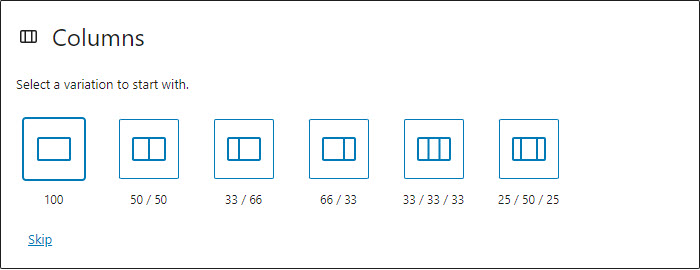
The Columns block can be very useful in helping to create attractive and interesting page layouts. You may choose from a variety of column layouts. Number of columns and column widths can easily be changed later, in the settings. Up to 6 columns are supported natively. The columns block has class wp-block-columns, the inner columns each…
-
Block Editor – Group Block

The Group block can be very useful in helping to create attractive and interesting page layouts. You can start by inserting a Group block and then adding the desired blocks inside the group. Or you can transform an existing block into a Group block – this has the effect of wrapping the current block inside…
-
Website Page Layout with the Block Editor

The Block Editor (also known as Gutenberg) provides some handy blocks which allow for the creation of attractive and interesting website and page layouts. Groups, Rows and Columns blocks, in combination with images and colour, can be used to create attractive and interesting website page layouts […]
-
Transform a Block into a Group or Column

The WordPress Block Editor offers a simple way to transform a block into a different type of block. Clicking on the block icon in the top left of the block control bar, you are offered a list of options. This is the set of blocks which are available possibilities for transforming the current block […]
-
The Only Slider You’ll Ever Need
I’ve just found my favourite website slider – Gutenslider. It blends seamlessly into the WordPress Block Editor, allowing easy update using a familiar interface. And it includes all of the display options I have needed in recent years, for client websites […]
-
Block Editor – Further Formatting

previously published as “Gutenberg Blocks – Further Formatting” Here are some other useful text formatting blocks, beyond the more typically used formatting blocks. These blocks can be found in the Text section of blocks. Quote “I wish it need not have happened in my time.” “And so do all who live to see such times.…
-
Block Editor – Cover Image
previously published as “Gutenberg Blocks – Cover Image” Simple Example of Cover Image Block Very simply, the Cover Image block allows you to include an image with text sitting in front of it, like the image below (where the words “Simple Cover Image Block” are not part of the image but text typed directly into…
-
Block Editor – Wide Alignment and Full-width

previously published as “Gutenberg Blocks – Wide Alignment and Full-width” The Block Editor (Gutenberg) introduces some new and interesting alignment options:- These options require that your theme explicitly supports them. See Developer Aside for a deeper discussion on what is needed to support the wide-alignment and full-width options. What Block Types Can Be Full or…
-
Block Editor – Video, Audio and Embeds

previously published as “Gutenberg Blocks – Video, Audio and Embeds” Adding video or audio with the Block Editor is fairly intuitive and perhaps a clearer and simpler process than with the classic WP editor. Audio The Audio block allows you to upload or select from the library an audio (mp3) file. Alternatively, you can enter…


